
Is your Kitchen Aid refrigerator water tasting off or flowing slower than usual? It might be time to replace your water filter.
Changing the filter may sound tricky, but it’s simpler than you think—and doing it right can save you from unwanted impurities and keep your drinks fresh and clean. In this guide, you’ll learn exactly how to replace your Kitchen Aid refrigerator water filter quickly and easily.
Keep reading to find out the step-by-step process that will help you enjoy pure, great-tasting water every day.
Signs To Replace Water Filter
Knowing when to replace your Kitchen Aid refrigerator water filter keeps your water clean and fresh. The filter traps impurities that affect taste and water flow. Signs appear that show the filter is no longer working well. Spotting these signs early ensures you drink pure water every day.
Reduced Water Flow
Water coming from the dispenser slows down significantly. The filter may be clogged with dirt and particles. This blockage lowers the water pressure. If you notice a weak flow, it’s time to change the filter.
Unusual Taste Or Odor
Water tastes strange or smells odd. The filter no longer removes bad tastes or smells. This can happen if the filter is old or damaged. Fresh water should taste clean and smell neutral. A change is necessary to keep your water enjoyable.
Filter Indicator Light
Your refrigerator has a built-in filter indicator light. It turns on or blinks when the filter needs replacement. This light helps you remember to change the filter on time. Don’t ignore this alert to avoid poor water quality.
Types Of Kitchenaid Water Filters
KitchenAid water filters come in different types. Each type suits different needs and usage. Choosing the right filter keeps water clean and tasting fresh. Knowing the types helps replace the filter correctly. Here are the main types of KitchenAid water filters.
Standard Filters
Standard filters are the common choice for many refrigerators. They remove chlorine, odors, and some contaminants. These filters help improve water taste and smell. They usually last about six months before replacement. Standard filters are easy to install and fit most KitchenAid models.
High-capacity Filters
High-capacity filters last longer than standard ones. They can filter more gallons of water before needing a change. These filters remove more impurities for better water quality. Ideal for larger families or heavy water users. Installation is similar to standard filters but with extended use.
Tools Needed For Replacement
Gather a new water filter, a towel, and a small bowl. The towel catches spills, and the bowl holds water.
Replacing a Kitchen Aid refrigerator water filter is a straightforward process, but having the right tools on hand can make it even simpler. While you might be tempted to dive right in, taking a moment to gather the necessary tools can save you from unexpected hurdles. Imagine the satisfaction of completing the task without a hitch, knowing you've prepared adequately.
Essential Tools
Begin by collecting a few simple tools. A flashlight can help illuminate the filter compartment if it’s tucked away in a dimly lit area. You may also want a towel or small basin to catch any water that might spill during the replacement.
Filter Type Knowledge
Understanding the type of filter your refrigerator uses is crucial. Most Kitchen Aid refrigerators use either a push-in or twist-in filter. Check your refrigerator manual or the existing filter for this information. This knowledge will guide you in choosing the correct replacement filter.
Replacement Filter
Ensure you have the replacement filter ready. It's best to purchase a genuine Kitchen Aid filter to ensure compatibility and optimal performance. Keep it handy so you can switch the old one out without delay.
Patience And Confidence
While not a physical tool, a bit of patience and confidence goes a long way. Approach the task with a calm mindset, and remind yourself that you've got everything you need for a smooth replacement. Have you ever noticed how a little self-assurance can make even the trickiest tasks seem more manageable? Getting everything in place before starting can transform a potentially frustrating experience into a quick and satisfying task. Are you ready to tackle this home maintenance task with ease?
Preparing For Filter Replacement
Preparing for a Kitchen Aid refrigerator water filter replacement is simple. It ensures the new filter fits well and works properly. This preparation saves time and prevents errors during the process.
Locate The Water Filter
The water filter is usually inside the fridge or at the base. Common spots include the upper right corner or bottom grille. Check your model’s manual for the exact location.
Look for a round or rectangular filter housing. It often has a twist-off cap or a push-in mechanism.
Turn Off Water Supply
Stop water flow to avoid leaks during replacement. Find the water valve behind or under the refrigerator. Turn it clockwise to close it.
Closing the water supply helps prevent spills and damage. Keep a towel nearby in case of drips.
Gather Replacement Filter
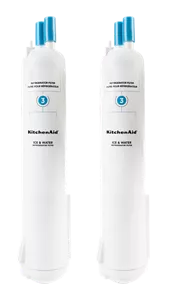
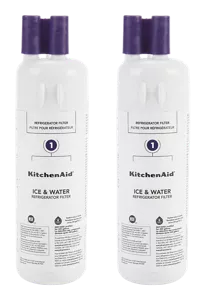
Use the correct filter for your Kitchen Aid model. Check the manual or filter label for the part number. Buy a genuine filter for best performance.
Keep tools like gloves or a cloth handy. They help with grip and cleanliness during the swap.
Removing The Old Filter
Removing the old water filter from your Kitchen Aid refrigerator is a straightforward task, but it requires some care to avoid damage. Understanding the right technique will save you time and frustration. Let’s explore how to get that old filter out smoothly and prepare for a fresh, clean replacement.
Twist And Pull Method
The most common way to remove your Kitchen Aid refrigerator water filter is the twist and pull method. First, locate the filter compartment—usually inside the fridge, near the top or side wall.
Grip the filter firmly and turn it counterclockwise about a quarter turn. You should feel it loosen. Once loose, gently pull the filter straight out. Avoid using excessive force; if it doesn’t budge, check if it needs a bit more twisting.
This method is quick and effective for most filters. Have you noticed how some filters feel tight at first but release easily with just a little patience? That’s the key here.
Handle Stuck Filters
Sometimes, filters get stuck due to mineral buildup or prolonged use. If twisting and pulling doesn’t work, don’t rush or use tools that could break the filter or the housing.
Try pressing the release button or latch if your model has one. You can also apply a gentle rocking motion while twisting to break the seal. Running a warm cloth around the filter base can help loosen mineral deposits.
If the filter remains stuck, consider unplugging the fridge for a few minutes to let any plastic components contract slightly, making removal easier. Have you ever struggled with a stuck filter? What tricks worked for you?
Credit: www.kitchenaid.com
Installing The New Filter
Installing the new water filter in your Kitchen Aid refrigerator is simple. This step ensures clean and fresh water for your home. Follow these clear instructions to place the filter correctly and secure it firmly.
Aligning The Filter
Hold the new filter with the label facing outward. Look inside the filter slot for alignment grooves. Match the filter tabs with these grooves carefully. This alignment prevents leaks and ensures proper function. Gently push the filter into the slot without forcing it.
Securing The Filter In Place
Once aligned, twist the filter clockwise to lock it. You will feel resistance as it locks into position. Stop twisting when it clicks or feels tight. Check that the filter sits flush with the fridge surface. This tight seal keeps water clean and stops leaks.
Resetting The Filter Indicator
Resetting the filter indicator is a crucial step after replacing your Kitchen Aid refrigerator water filter. This action clears the alert light and lets the fridge track the new filter’s usage accurately. Keeping this indicator updated helps maintain water quality and ensures timely filter changes.
Using The Control Panel
Most Kitchen Aid models have a control panel with a filter reset button. To reset the indicator:
- Press and hold the "Filter Reset" button for about 3 seconds.
- Wait for the light to blink or turn off, signaling the reset.
- Release the button once the indicator changes.
This method is quick and easy. It helps the fridge recognize the new filter immediately.
Manual Reset Options
If your model lacks a control panel button, try a manual reset. Follow these steps:
- Open the refrigerator door.
- Press and hold the "Ice Type" or "Light" button for 3 to 5 seconds.
- Look for the filter light to turn off or blink.
- Close the door and check if the indicator stays off.
This option works for older or simpler Kitchen Aid refrigerators. It resets the filter monitor without special tools.
Testing The New Filter
Testing the new Kitchen Aid refrigerator water filter is important. It ensures clean water and proper filter function. This step helps spot problems early. Follow these simple actions to confirm your filter works well.
Running Water Through The Filter
Start by turning on the water dispenser. Let water flow for about 3 to 5 minutes. This clears air and loose carbon particles from the filter. The water may look cloudy at first, but it will clear up. Running water also helps the filter settle and work correctly.
Checking For Leaks
After running water, inspect the filter area carefully. Look for any drips or moisture around the filter housing. Use a dry cloth to wipe the area and check again. If you find leaks, push the filter firmly into place. Leaks may mean the filter is not installed properly or the seal is damaged.
Maintenance Tips For Water Filters
Keeping your Kitchen Aid refrigerator water filter in top shape is essential for fresh, clean water. Proper maintenance not only extends the filter’s life but also protects your health by ensuring contaminants don’t build up. Let’s look at some practical tips to keep your water filter working efficiently.
Regular Replacement Schedule
One of the simplest ways to maintain your water filter is to replace it regularly. Most Kitchen Aid filters need changing every 6 months, but this can vary based on water quality and usage. Have you noticed a change in water taste or flow? That’s usually a sign it’s time to swap the filter.
Setting a reminder on your phone or calendar can help you stay on track. Don’t wait until the filter clogs and affects your water quality. Think of it like changing oil in a car—it keeps everything running smoothly.
Cleaning The Filter Housing
When replacing the filter, take a moment to clean the filter housing. Dirt and mold can accumulate in this area if left unchecked. Use a soft cloth and mild soap to wipe the inside gently, avoiding harsh chemicals that might damage the housing.
Dry the housing thoroughly before installing the new filter. This step prevents moisture buildup that could encourage bacterial growth. Have you ever skipped this cleaning? You might be surprised how much cleaner your water tastes after just one thorough wipe.
Credit: www.kitchenaid.com

Credit: www.searspartsdirect.com
Frequently Asked Questions
How Often Should I Replace Kitchen Aid Water Filter?
Replace your Kitchen Aid water filter every 6 months. This ensures clean, fresh-tasting water and optimal appliance performance. Frequent replacement prevents clogging and bacteria growth, keeping your water safe and your refrigerator functioning smoothly.
What Tools Are Needed To Replace The Filter?
No special tools are needed. You just need your hands to twist and remove the old filter. Some models may require a small coin or flathead screwdriver to open the filter compartment, but most filters are designed for easy hand replacement.
How Do I Identify The Correct Filter Model?
Check your refrigerator manual or the old filter for the model number. You can also find compatible filters on the Kitchen Aid website or retailer listings. Using the correct filter ensures proper fit and water filtration.
Can I Reset The Water Filter Indicator Light?
Yes, after replacing the filter, press and hold the reset button on your refrigerator’s control panel. This turns off the indicator light and tracks the new filter’s usage, helping you remember when to replace it next.
Conclusion
Replacing your Kitchen Aid refrigerator water filter keeps water fresh and clean. Regular changes help avoid clogs and bad taste. The process is quick and easy with the right steps. Always check your filter model before buying a replacement. Clean water means better drinks and healthier meals.
Stay on schedule to enjoy pure water every day. A small task with big benefits for your home. Trust yourself to do it right. Your fridge will thank you.