

If you want clean, fresh-tasting water straight from your KitchenAid refrigerator, changing the water filter regularly is key. But maybe you’re not sure how to do it or worried it might be complicated.
Don’t worry—this guide will show you exactly how to change your KitchenAid refrigerator water filter quickly and easily. By the end, you’ll know the simple steps to keep your water pure and your fridge running smoothly. Keep reading—you’re just a few minutes away from better water!
Identifying The Filter Type
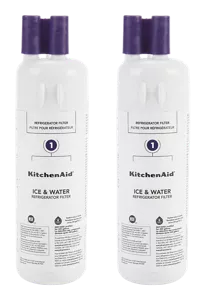
Identifying the correct water filter type is crucial for a Kitchen Aid refrigerator. Using the wrong filter can affect water quality and appliance performance. Start by locating the filter inside your fridge. Then check the model number to find the exact filter type you need.
Locating The Water Filter
The water filter is usually inside the refrigerator compartment. Common spots include:
- Top right corner near the ceiling
- Bottom grille or kickplate area
- Back or side wall inside the fridge
Look for a small cylindrical or rectangular cartridge. It may have a twist or push-in design. Remove the cover gently to access it.
Checking The Model Number
Find the model number on the fridge label. This label is often inside the door frame or on the side wall. Note down the full model number carefully.
Use this number to search for the compatible water filter. Kitchen Aid filters come in various types, such as:
- Twist-in filters
- Push-in filters
- External inline filters
Matching the model number ensures you buy the right filter. This helps maintain clean water and proper fridge function.
Credit: www.kitchenaid.com
Preparing For Replacement
Gather all necessary tools and a new water filter before starting. Turn off the water supply to avoid leaks during replacement. Make sure the refrigerator is clean and dry around the filter area.
Preparing your KitchenAid refrigerator for a water filter replacement ensures a smooth process. Proper preparation prevents mishaps and makes the task efficient. Before you start, create a checklist of tasks. This ensures you have everything you need.
Gathering Necessary Tools
Start by gathering all essential tools. A new water filter, a small towel, and a container or bowl. The towel catches any drips. The container holds the old filter and water. A simple approach saves time and frustration.
Turning Off The Water Supply
Locate the water supply valve behind your refrigerator. Turn it off before removing the filter. This prevents water from spilling. Check if the valve is fully closed. This step ensures safety and avoids water damage.
Removing The Old Filter
Removing the old water filter from your Kitchen Aid refrigerator is essential for fresh, clean water. The process involves two key actions: unlocking the filter housing and carefully pulling out the filter. This section breaks down these tasks into simple steps to make the job quick and safe.
Unlocking The Filter Housing
Start by locating the water filter housing inside the fridge. It usually sits in the upper right corner or near the water dispenser. Check for a small latch or button on the housing.
Press or slide the latch gently to release the filter cover. Avoid using too much force to prevent damage. Once unlocked, the filter housing will open, exposing the old filter.
Safely Extracting The Filter
Grasp the old filter firmly but carefully. Turn it counterclockwise or pull it straight out, depending on your model. Some filters twist, while others simply slide out.
Keep a towel nearby to catch any water drips. Pull the filter out slowly to avoid spills. Dispose of the old filter according to your local guidelines.
Installing The New Filter
Installing the new filter is a key part of maintaining your Kitchen Aid refrigerator’s water quality. It might seem straightforward, but a precise fit ensures your water stays clean and your fridge runs smoothly. Let’s look at how to get the new filter installed correctly.
Aligning The Filter Correctly
Start by checking the shape and notches on your new filter. These are designed to fit only one way into the filter housing. Take a close look inside the filter slot and line up the notches on the filter with the grooves in the slot.
Try to avoid forcing the filter in. If it doesn’t slide in easily, it probably isn’t aligned right. Think of it like fitting a puzzle piece—if it’s a struggle, double-check the position before pushing further.
Securing The Filter In Place
Once aligned, gently push the filter into the slot until it stops. You should feel or hear a slight click, indicating it’s locked in place. This step is crucial to prevent leaks or the filter from falling out.
After insertion, turn the filter clockwise to tighten it if your model requires it. Don’t overtighten; a firm twist is enough. If your filter feels loose, it might cause problems with water flow or even damage the sealing gasket.
Resetting The Filter Indicator
Resetting the filter indicator is an important step after changing your Kitchen Aid refrigerator water filter. This process clears the filter status light. It helps you track when the next filter change is due. Resetting keeps your water fresh and your fridge running efficiently.
Using Control Panel Buttons
Locate the control panel on your refrigerator door. Press and hold the “Filter Reset” button. Hold it for about 3 seconds. The filter indicator light will blink or turn off. This signals the reset was successful. Some models use the “Water” or “Ice” button instead. Check your user manual for exact buttons. The control panel buttons are simple and easy to use.
Verifying The Reset
After resetting, the filter light should be off or green. Test by pressing the filter button again. If the light stays off, reset is complete. If it still shows red or orange, repeat the reset process. This ensures your fridge tracks the new filter correctly. A properly reset indicator means clean water and ice. Keep an eye on the light for future changes.
Flushing The New Filter
Flushing the new water filter is a crucial step after installation. It helps remove any loose carbon particles and ensures the water tastes fresh and clean. Skipping this step might leave your water tasting odd or even clog your filter prematurely.
Running Water Through The Filter
Start by turning on your refrigerator’s water dispenser. Let the water run for about 3 to 5 minutes, or roughly 2 to 3 gallons, to flush out impurities.
Pay attention to the water flow—it should be steady and clear. If the water runs slowly or looks cloudy, double-check the filter installation. Sometimes, filters need a slight twist or push to lock properly.
Have you noticed a strange taste or smell after installing a new filter? Running water through it usually clears that up quickly.
Checking For Leaks
Once you finish flushing, inspect the area around the filter for any signs of leaks. Look for water droplets or dampness near the filter housing and underneath the refrigerator.
Leaks often mean the filter isn’t seated correctly. Try removing and reinstalling the filter firmly until you hear a click or feel it lock into place.
Don’t forget to check again after a few hours of use. Early detection of leaks can save you from bigger problems later on.
Troubleshooting Common Issues
Changing your Kitchen Aid refrigerator water filter usually goes smoothly, but sometimes you might hit a snag. Troubleshooting these common issues can save you time and frustration. Let’s look at how to handle two frequent problems: filters that don’t fit right and water that tastes or smells off.
Filter Not Fitting Properly
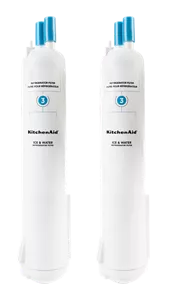
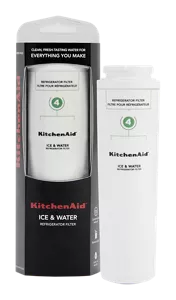
If your new water filter feels loose or won’t snap into place, double-check the model number. Kitchen Aid filters come in various sizes, and using the wrong one can cause fitting problems.
Also, inspect the filter housing for any debris or damage. Even small bits of dirt can prevent a secure fit.
- Try gently twisting the filter while pushing it in to ensure it seats correctly.
- Don’t force the filter; forcing may damage the filter or the refrigerator’s filter compartment.
Have you ever felt stuck trying to fit something that just won’t click? Patience and a little inspection often reveal the real issue.
Water Taste Or Odor Problems
Bad taste or smell after replacing the filter might mean the filter needs flushing. Run several gallons of water through the dispenser to clear out any trapped carbon particles.
If the taste or odor persists, consider these points:
- Is the filter past its expiration date? Old filters lose effectiveness.
- Did you forget to remove the protective cap before installation?
- Is the water source itself causing the problem?
Changing the filter regularly and flushing it after installation can make a big difference. Have you noticed a change in water quality after replacing your filter? If not, it might be time to check these details.
Credit: www.kitchenaid.com
Credit: www.kitchenaid.com
Frequently Asked Questions
How Do I Locate The Water Filter In Kitchenaid Refrigerator?
The water filter is usually inside the fridge compartment. Check the upper right or bottom grille area. Refer to your manual for exact location.
How Often Should I Replace Kitchenaid Water Filter?
Replace the water filter every 6 months. If water flow decreases or taste changes, replace it sooner for clean water.
Can I Use Any Replacement Filter For Kitchenaid Fridge?
Use only KitchenAid-approved filters. Generic filters may not fit properly or filter water effectively. Check compatibility before purchase.
What Steps Are Involved In Changing The Water Filter?
Turn off water supply, twist out old filter, insert new one, and flush water. Follow safety and manufacturer instructions carefully.
Conclusion
Changing your Kitchen Aid refrigerator water filter is simple and quick. Regular filter changes keep water clean and fresh. Follow the steps carefully to avoid mistakes. Check your filter every six months for best results. Clean water means better taste and healthier drinks.
Stay consistent to enjoy safe water daily. Your fridge will work better with a new filter. Keep these tips handy for easy future changes. Simple care leads to long-lasting fridge performance.